Three mental models for the concepts in SPK-101 that take the most brain-power to grasp: addresses and values, addressing modes, and the bitplane encoding that stores NES sprites. Each tool is a picture you can hold in your head or draw on paper. None of them require a computer.
Reading level: aimed at a motivated 12-year-old working independently. Instructors: see INSTRUCTOR-GUIDE.md for the pacing notes that accompany these tools.
Heads-up (added 2026-05-16): the week-1 and week-4 lesson pages now carry interactive in-browser versions of the Mailbox-style offset visualizer (week 4 scene A) and the Bitplane Decomposer (week 4 scene C). This supplement remains the deeper-dive reference; the inline scenes give you a fast practice loop, and this page gives you the worked-out longer-form treatment.
Tool 1: The Mailbox Metaphor for RAM (addresses vs. values)
The idea
Your computer's RAM is a very long row of tiny storage slots. Each slot holds one byte (one number from 0 to 255). Every slot has an address: a number that tells you where that slot is in the row.
Picture it as a wall of mailboxes: the kind you might see in an apartment building lobby. Each mailbox has a number on the door (the address) and holds a small piece of paper inside (the value stored there).
Notation note: this tool uses $ as the prefix for hexadecimal numbers, following 6502/Commodore convention (so $FF = decimal 255, $00 = decimal 0). FND-101 uses the 0x prefix (C/Linux convention). The two prefixes mean the same thing.
The number on the front of the mailbox is the address. The paper inside is the value. These are two different things.
Why this matters in 6502 assembly
Two 6502 instructions look almost the same but mean completely different things:
| Instruction | What it means |
|---|---|
LDA #$01 |
Load the literal number 1 into the accumulator. Do not look in any mailbox. The # means "the number right here." |
LDA $01 |
Go to mailbox number $01. Take out the paper inside. Load that number into the accumulator. |
The only visible difference is the #. That # is the most important symbol in 6502 assembly for new learners.
The NES zero page as a live 16x16 grid
The NES's zero page (addresses $00 through $FF) is the fast-access part of RAM: the first 256 mailboxes. The 16x16 grid below renders all 256 cells live. Each cell shows its address ($XX) on the top edge and its current value on the bottom edge. Hover any cell for a tooltip; click a cell to step its value upward by one (and watch the cell pulse so you can feel the change).
The accumulator widget to the right of the grid is the single "A" register: a separate mailbox styled with a green border because it is the place every LDA instruction lands and every STA instruction reads from. Watch it during the worked examples.
Scene 1A, the grid
Three worked examples
The three buttons above play the three worked examples that the static prose used to walk through. Click one and watch the grid and the accumulator update. The operand-reading toggle at the top changes the interpretation of any operand that does not carry a #: in addressed mode the operand is a mailbox address (the correct 6502 reading), in literal mode the operand is treated as the value itself (the common-but-wrong student reading).
Example 1: Store a value in a mailbox. Two instructions run in sequence. First LDA #$42 loads the literal value $42 (= 66 in decimal) into the accumulator; the # makes the operand unambiguous so the toggle does not affect this line. Then STA $00 stores the accumulator into mailbox $00. After the second instruction, mailbox $00 holds $42. STA is always addressed; you cannot write STA #$00 because a literal is not a place values live.
Example 2: Read from a mailbox. One instruction: LDA $00. In addressed mode the accumulator receives the value currently sitting in mailbox $00 (initial state: $42). In literal mode the accumulator receives the byte $00 itself (so A becomes 0). Toggle the mode and re-run Example 2 to see the divergence.
Example 3: Confusing an address with a value. A student wants to load the value 1 into the accumulator, so they write LDA $01 instead of LDA #$01. In addressed mode the CPU goes to mailbox $01 and reads whatever is stored there; mailbox $01 starts with $FF in this grid, so the accumulator becomes $FF. In literal mode the same instruction is read as "A becomes 1," which feels right and looks right until the day mailbox $01 holds anything other than 1. The fix is in the prose above: when you mean a literal value, write #$X. When you mean the value living at address X, write $X without the #.
Wrong-vs-right side-by-side
The common-mistake small-multiple below runs Example 3 in both modes at the same time. The left panel is the literal (wrong) reading of LDA $01; the right panel is the addressed (correct) reading. Both panels start from the same grid state. Look at the two accumulators after the run: the divergence is the cost of forgetting the #.
Example 3 side-by-side: wrong vs right
Both panels run LDA $01. Mailbox $01 starts at $FF. The wrong (literal) reading and the right (addressed) reading produce different accumulator values.
Wrong: literal reading of LDA $01
Right: addressed reading of LDA $01
Walk a 4-cycle program with the scrub bar
The scrub bar below steps through a 4-cycle program one cycle at a time. Click any cycle button to jump there, use left/right arrow keys to step, or Home/End to jump to the ends. The grid and accumulator snap to the state at that cycle. The program:
LDA #$42    ; cycle 1: A <- $42 (literal)
STA $00     ; cycle 2: mailbox $00 <- $42 (A is stored at addressed mailbox)
LDA $00     ; cycle 3: A <- value at mailbox $00 (now $42 again)
STA $01     ; cycle 4: mailbox $01 <- $42 (A is stored at addressed mailbox)
The pedagogical point: cycle 1 is the only literal operand. Cycles 2, 3, 4 all use addressed operands. Scrubbing back and forth makes the difference between the two readings visible in time, not just on the page.
Drag through the program. Each cycle's behavior writes to the grid (gold flash for writes, green flash for reads). The accumulator pulses on every cycle that changes A.
Where this metaphor recurs
The Mailbox metaphor is the standard way the Virtus Cyber Academy introduces memory addresses. You will see it again in CSA-101 Chapter 3 (Memory), where the same 16x16 grid will recur in the context of the RV32I-Lite memory map. If you learn to see addresses as mailbox numbers now, that picture carries forward without needing to re-learn it.
Tool 2: The Addressing Mode Flowchart
The idea
When you see a 6502 instruction, you need to figure out what kind of operand it has. The flowchart below classifies any operand you type into one of six modes. Type any operand into the free-input box; the SVG lights the leaf the parser picked, and the three Q chips at the top show how the parser reached that answer. Start at the input box every time you meet an operand you are not sure about.
The one rule to tattoo on your brain
# = literal value. No # = address.
Every other distinction in the flowchart is secondary. Getting the # question right eliminates 90% of addressing mode confusion. The other two questions in the flowchart (how many hex digits, and is the operand indexed or indirect) split addresses into Zero Page, Absolute, and the two indirect variants.
Scene 2A, the decision tree at rest
Below is the rendered decision tree. Six leaves: Implied (no operand at all), Immediate (operand starts with #), Zero Page (1-byte address), Absolute (2-byte address), Indirect Zero Page (parens around a 1-byte address), Indirect Absolute (parens around a 2-byte address). The Q chips Q1, Q2, Q3 at the top show the three questions the flowchart asks; their answers stay blank until you give the tree an operand to think about. Scan the leaves; read the small example next to each one; predict in your head which leaf $80,X would land on before you scroll down and try it.
Scene 2B, free-input mode
Type any 6502 operand below. The parser reads what you type left-to-right and lights the matching leaf in real time. Try the test cases the supplement gives you (#$05, $80, $0200, $0200,X, ($FFFC)); then try edges (the empty string is implied; 0xFF is rejected because the academy uses $ not 0x for this prefix; $GG is rejected because G is not a hex digit). Read the friendly error message when the parser refuses an operand; the message tells you exactly which grammar rule rejected the input.
Scene 2C, predict then verify
Now do the predict-then-verify pass. Leave (or paste) an operand in the input above, pick which leaf you think it belongs to from the dropdown below, then click Verify. Correct picks light the leaf green; wrong picks light your pick red and the correct leaf green so you see both at once, plus a one-sentence reason pulled from the supplement prose. Cycle through five or six operands of your own and you will not need the flowchart anymore. The pattern becomes automatic.
Worked examples for each leaf (static reference)
The interactive above is the primary surface; the table below stays as a print-and-paper reference. Every row maps to one of the six leaves the parser recognizes.
| Instruction | Mode | Meaning |
|---|---|---|
RTS |
Implied | No operand. The instruction acts on an implied register or the stack. |
LDA #$05 |
Immediate | A = 5 (the literal number 5) |
LDA $80 |
Zero Page | A = value stored at address $80 |
LDA $80,X |
Zero Page (indexed) | A = value stored at address ($80 + X) |
LDA $0200 |
Absolute | A = value stored at address $0200 |
LDA $0200,X |
Absolute (indexed) | A = value stored at address ($0200 + X) |
LDA ($10,X) |
Indirect Zero Page (X-pre) | Add X to $10; fetch the 2-byte pointer from there; A = value at that pointer |
LDA ($10),Y |
Indirect Zero Page (Y-post) | Fetch the 2-byte pointer from $10; add Y to it; A = value at the result |
JMP ($FFFC) |
Indirect Absolute | Jump to the 2-byte address stored at $FFFC-$FFFD |
Notice that STA #$0200 is NOT a valid instruction. You cannot store TO a literal number -- a literal is not a location. The destination of a store must always be an address. The free-input box above rejects #$0200 with the same nudge: an immediate is a single byte, not two.
The decision tree, as ASCII (accessibility fallback)
The interactive flowchart above is the primary surface. The ASCII version below is the same tree rendered in plain text for printing, screen-reader workflows, and the moments when your laptop is closed.
Look at the operand.
         |
         v
Does it start with #?
    /         \
  YES          NO
   |            |
   v            v
Immediate.    Is the operand in parentheses?
The number          /             \
in the            YES              NO (direct)
instruction        |                |
is the value.      v                v
              Is the address    Is the address
              $XX or $XXXX?     $XX or $XXXX?
                 /    \           /    \
              $XX    $XXXX      $XX    $XXXX
               |       |         |       |
               v       v         v       v
          Indirect  Indirect  Zero    Absolute
          ZP (with  Absolute  Page    (full 16-bit
          ,X or ,Y) (JMP only)         address)
If the operand is empty (no bytes at all after the opcode), the instruction is Implied: RTS, NOP, CLC, and friends. Implied is a leaf in the flowchart even though it never asks Q1 at all.
How to use this during labs
Use the interactive surface above during Lab 3.2 (reading the Mesen debugger) and Lab 4.1 through 4.4 the way you would use a sandbox: type an operand, watch the leaf light, predict the next one yourself before typing it. After about 30 to 40 operands the pattern becomes automatic and you can read 6502 source at speed without consciously thinking about the question chain.
For exam conditions where no laptop is allowed, the ASCII tree above prints to a single index card. Most students who use the interactive for an hour or two never need the card.
Where this flowchart recurs
The same addressing mode logic recurs in CSA-101 Chapter 4 (Machine Language, RV32I-Lite instruction formats). The 6502 and RISC-V have different instruction encodings, but the question "is this operand a literal value or an address?" is the same question. Getting fluent with the 6502 version now makes the RISC-V version much easier to absorb later.
Tool 3: The Bitplane Decomposer
The idea
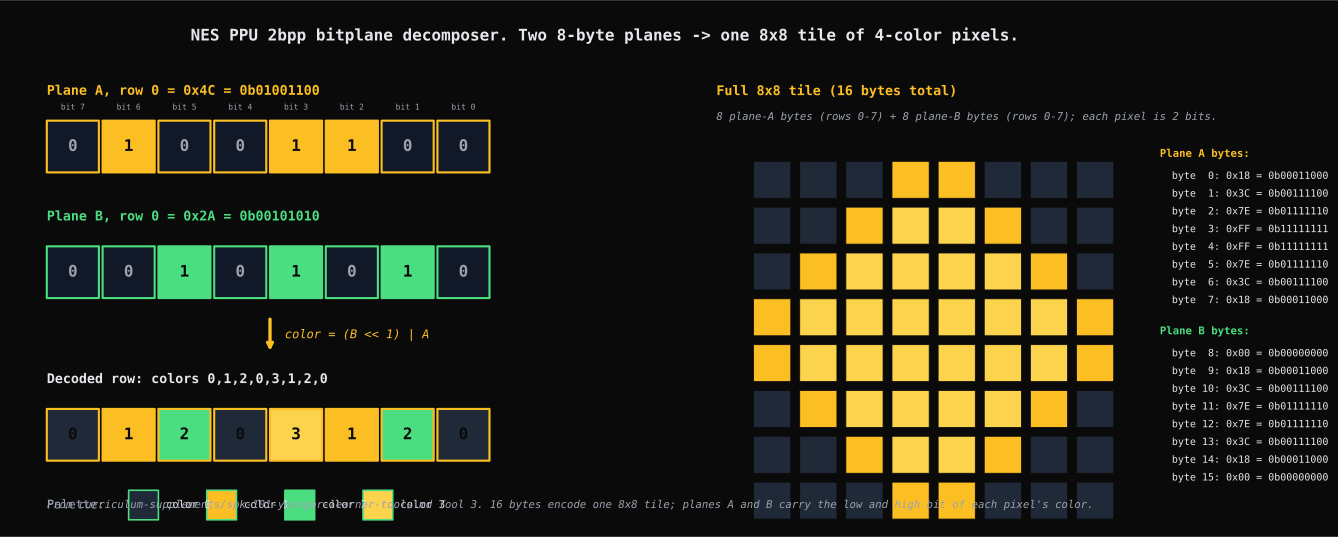
An NES sprite tile is an 8x8 grid of pixels. Each pixel can be one of four colors (called color 0, 1, 2, 3). Two bits per pixel times 64 pixels = 128 bits = 16 bytes.
The 16 bytes are stored as two separate 8-byte "planes." Plane A is bytes 0-7 (one bit per pixel for the low bit of the color index). Plane B is bytes 8-15 (one bit per pixel for the high bit of the color index).
<img src="../assets/diagrams/spk-101-ppu-bitplane-decomposer.svg" alt="NES PPU 2bpp bitplane decomposer. Left half walks the worked example: Plane A row 0 byte (0x4C, amber-bit cells) and Plane B row 0 byte (0x2A, green-bit cells) feed an OR-shift formula that produces an 8-pixel decoded row showing colors 0, 1, 2, 0, 3, 1, 2, 0 in the 4-color palette. Right half shows a full 8x8 tile rendered from 8 plane-A bytes and 8 plane-B bytes (a diamond / plus motif), with the 16 byte values listed in hex and binary alongside." />
Figure T3. The same worked example the §"Step-by-step: decode one row by hand" section walks in prose. The amber Plane A row contributes the low bit of each pixel's color; the green Plane B row contributes the high bit; the decoded row at the bottom is what the PPU draws to screen for row 0 of that tile. The full 8x8 tile on the right shows how all 16 bytes (8 plane-A + 8 plane-B) become one tile of graphics.
Tile layout in memory:
  Byte 0:  [b7][b6][b5][b4][b3][b2][b1][b0]   <- Plane A, row 0
  Byte 1:  [b7][b6][b5][b4][b3][b2][b1][b0]   <- Plane A, row 1
  ...
  Byte 7:  [b7][b6][b5][b4][b3][b2][b1][b0]   <- Plane A, row 7
  Byte 8:  [b7][b6][b5][b4][b3][b2][b1][b0]   <- Plane B, row 0
  ...
  Byte 15: [b7][b6][b5][b4][b3][b2][b1][b0]   <- Plane B, row 7
For pixel at column C, row R:
- Bit C of Plane-A byte R = the low bit of that pixel's color
- Bit C of Plane-B byte R = the high bit of that pixel's color
- Color index = (high bit << 1) | low bit = 0, 1, 2, or 3
Step-by-step: decode one row by hand
Say byte 0 (Plane A, row 0) = 0100 1100 in binary.
Say byte 8 (Plane B, row 0) = 0010 1010 in binary.
Work across from bit 7 (leftmost pixel) to bit 0 (rightmost pixel):
| Pixel | Plane A bit | Plane B bit | Color (B<<1 | A) | |---|---|---|---| | 0 (leftmost) | 0 | 0 | 0 | | 1 | 1 | 0 | 1 | | 2 | 0 | 1 | 2 | | 3 | 0 | 0 | 0 | | 4 | 1 | 1 | 3 | | 5 | 1 | 0 | 1 | | 6 | 0 | 1 | 2 | | 7 (rightmost) | 0 | 0 | 0 |
Row 0 of the tile, left to right: colors 0, 1, 2, 0, 3, 1, 2, 0.
The graph-paper exercise
Before touching any software in Lab 2.2 or Lab 4.3:
- Draw an 8x8 grid on graph paper (8 columns, 8 rows).
- Write out the 16 bytes of tile 0 as two rows of 8 binary numbers.
- For each row of the grid, fill in the color index for each pixel using the method above.
- Color in the grid with four pencils or pens (one per color).
This is slow. It is supposed to be slow. After doing it once by hand, you will never misread a byte offset or mix up Plane A and Plane B again.
What each byte controls
If you want to change the color of pixel (row=0, col=7):
- Low bit: bit 0 of byte 0 (Plane A, row 0)
- High bit: bit 0 of byte 8 (Plane B, row 0)
Change bit 0 of byte 0 from 0 to 1: the low bit of pixel (0,7) changes. The pixel shifts from color 0 to color 1.
Knowing this lets you predict what a byte edit will do before you make it. You should always be able to state your prediction out loud before touching the hex editor.
From graph paper to a live visualizer
The graph-paper method works but is slow. The Visual Bitplane Editor below is the second pass: same encoding, same formula, no eraser. Read the prose, scroll into each scene, and the visualizer wakes up step by step. The graph-paper pass stays useful as a first contact with the bytes; the visualizer is for second-pass verification once your method is sound.
Scene 3a, introduction
The visualizer above shows the same worked example you walked on graph paper: Plane A row 0 = 0x4C, Plane B row 0 = 0x2A, decoded row = 0, 1, 2, 0, 3, 1, 2, 0. Right now the visualizer is loaded but quiet. The Step button stays inactive until you scroll into the next scene; that gate is intentional, not broken. Read the row of bytes in the input table; scan the empty output grid; predict in your head which cell will light up first when you Step.
Scene 3b, step through one row
Click the Step button inside the visualizer. The first cell to light is pixel (row 0, col 0): Plane A bit 7 = 0, Plane B bit 7 = 0, color = 0. Click Step again. Pixel (0, 1) reads Plane A bit 6 = 1, Plane B bit 6 = 0, color = 1. The math callout under the controls shows the formula color = (PlaneB << 1) | PlaneA filled in for the active cell. Walk the first row this way; then click Step all to fill the whole tile in one go.
Scene 3c, predict then verify
Now do the predict-then-verify pass. Pixel (row 0, col 0) currently reads color 0 because Plane A bit 7 is 0. If you flip Plane A row 0 from 0x4C to 0xCC (set bit 7 to 1), what color does pixel (0, 0) become? Use the formula on a scratchpad: PlaneA bit 7 = 1, PlaneB bit 7 = 0 (unchanged), color = (0 << 1) | 1 = ?
Verify mutates the byte in the visualizer above and re-renders. The cell that changes is exactly pixel (0, 0); look at it before and after to feel the bit flip in motion. Once you have the prediction down, try one of your own: change Plane B row 1 to a non-zero byte, predict which pixels in row 1 gain the high bit, then verify.
Where these tools recur across the academy
All three tools address abstraction-density problems that appear in multiple academy courses, not just SPK-101.
| Tool | SPK-101 | CSA-101 | RE-011 |
|---|---|---|---|
| Mailbox metaphor | Week 2-4 (RAM addresses, ROM offsets) | Ch 3 (Memory), Ch 4 (machine language) | Week 3 (ELF sections, segment addresses) |
| Addressing Mode Flowchart | Week 3-5 (6502 addressing) | Ch 4 (RV32I-Lite addressing modes) | Week 4-5 (System V AMD64 operands) |
| Bitplane Decomposer | Week 2-4 (NES sprite format) | -- (not directly covered in CSA-101) | Week 2 bit-field decoding (e_type/e_flags fields in ELF byte-level view) |
The Mailbox metaphor is the strongest cross-course candidate for a shared handout. If you are working through CSA-101 after SPK-101, the mailbox grid will recur in Chapter 3. The picture is the same; only the scale changes (CSA-101 has a 32-bit address space instead of the 6502's 16-bit one, but the idea of "address on the front, value on the paper inside" is unchanged).
Instructors: if you are running both SPK-101 and CSA-101, you can use the Mailbox diagram from this supplement in CSA-101's Chapter 3 session without adaptation. The vocabulary is consistent by design.
Supplement v0.1. Engineering tools (Integrated Offset Calculator, Visual Bitplane Editor) are deferred to separate development briefs. This document covers the cognitive / mental-model layer only.
All technical terms used here are in the glossary.